
I bought this with my own money. Every product here did weeks of my workdays before I scored it. If you buy through a link on this page, I may earn a commission. How I test
How I used it
I bought the GF270J myself and it has been my main display for two weeks, running about 15 hours a day. My days run long and most of them happen on this screen: client calls, documents, spreadsheets, Slack, and everything in between, with some gaming after hours.
It replaced a Samsung M8 that broke. While I waited for a replacement, I tried working on a Full HD monitor for a bit and hated it. Once you've worked on 4K, going back is rough. Text is the reason. I needed 4K again, and I didn't want to pay smart-monitor money twice.
It runs over DisplayPort from my Mac, mounted on a monitor arm next to a second screen.
What it gets right
The price is the best thing about it. This is a proper 27-inch 4K panel at 160Hz for around $300, and it doesn’t feel like a compromise. That’s the whole pitch, and after two weeks I have nothing to subtract from it.
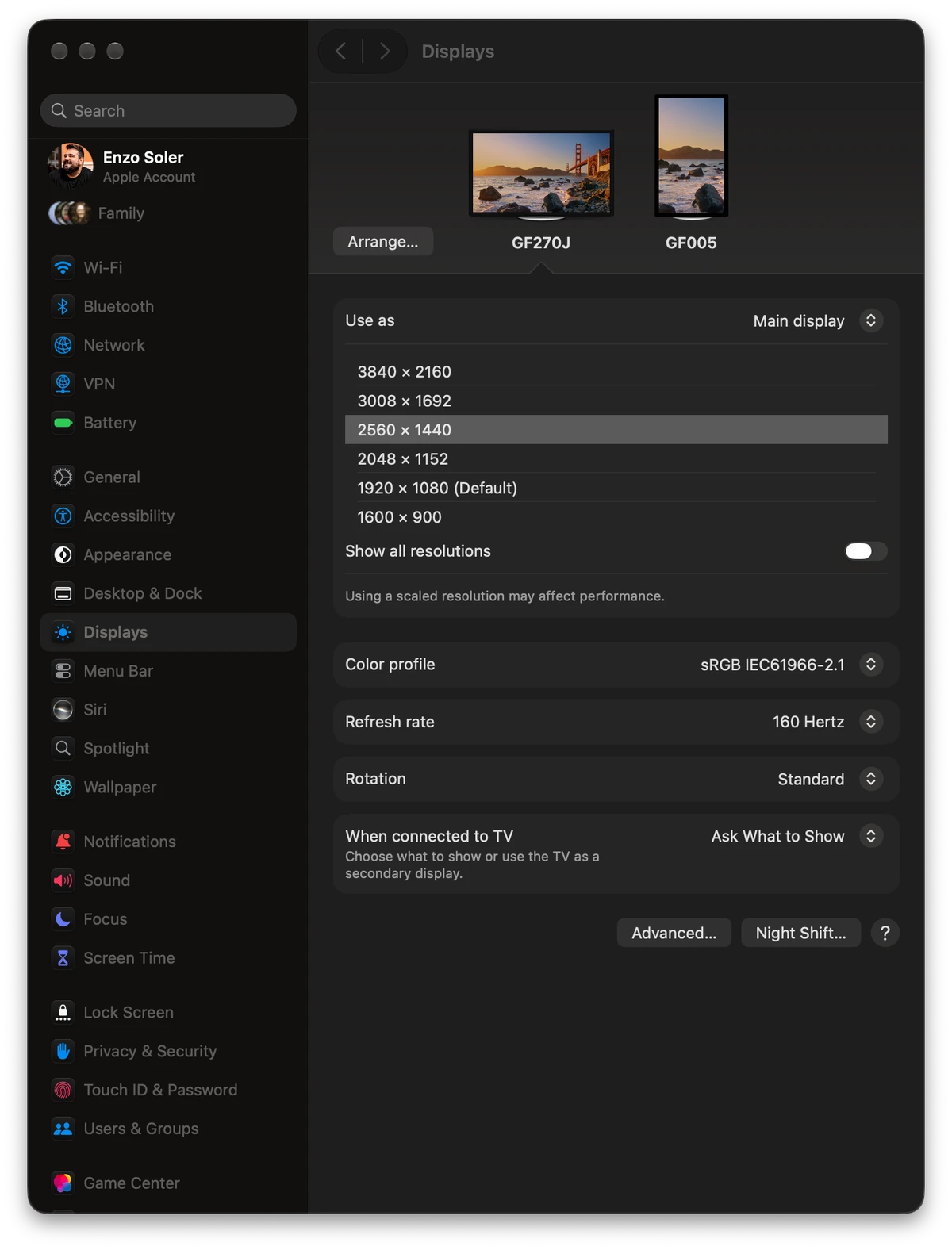
Text is very crisp. I run it at a scaled 1440p look on macOS, which is the sweet spot for a 27-inch 4K panel, and documents, code, and Slack are sharp all day. For 15-hour days, that matters more than any gaming spec.
It delivers its full 160Hz on a Mac. Budget monitors often promise a refresh rate the listing was written around and then quietly run lower on macOS. This one shows 3840 x 2160 at 160 Hertz in System Settings over DisplayPort, confirmed on my own machine. I actually keep it at 120Hz most of the time and it’s plenty smooth; the 160 is there when I want it.
Nothing has annoyed me yet. Two weeks as a main display at these hours is usually enough time for a cheap monitor to show its first ugly side. This one hasn’t.
What could be better
- The Samsung M8 felt a bit brighter to me. The spec sheets agree with my impression, 350 rated nits here against the M8’s 400. In my room it has not been a problem, but if you work in a very bright space, it’s worth knowing. Cheap 27-inch OLEDs are dimmer on a full white screen; see cheap 27-inch OLED or 4K IPS.
- Two weeks is early. I can tell you it’s a great start. I can’t tell you how it holds up after a year, and I won’t pretend otherwise.
How it compares
Against the Samsung M8, the Gawfolk wins on price by a huge margin and matches it where it counts for work, which is a sharp 4K image. The M8 wins on brightness and on the smart-TV side. It has its own apps and works like a TV without a computer attached. That sounds like a gimmick until you have it, and it’s what I miss. If you want that, pay up for the M8. If you want a screen for a computer, this does the job for a fraction of the price.
One more honest note, because I own two Gawfolk monitors. The second one, their 28-inch 4K, sits right next to this one, cost me more, and I don’t recommend it, mostly because my Mac very frequently stops seeing it until I replug the DisplayPort cable. The GF270J, on the same desk and the same Mac, had no recognition problem in its two-week review. So this isn’t brand loyalty talking. Within the same brand, the GF270J is the one I’d tell you to buy. If you’re weighing Gawfolk as a brand, what it sells and what its warranty says is its own guide.
If you’re choosing between the two Gawfolks, GF270J vs GF005 puts them side by side. If you can spend more than $300, the best monitor for a MacBook Pro covers when 5K, OLED or a Studio Display is worth it.
Specs
These are the maker's published figures unless a line says it comes from my own use.
- Panel
- 27-inch IPS, 3840 x 2160
- Refresh rate
- 160Hz
- Color
- 100% sRGB
- Brightness (rated)
- 350 nits
- Ports
- 2x DisplayPort 1.4, 2x HDMI 2.1
- Sync
- AMD FreeSync
Final verdict
I'd buy it again without a second thought. It replaced a monitor that cost more than twice as much, and for actual work on a Mac I don't miss much.
If you're looking for a budget monitor that's good for both work and gaming, this is a no-brainer. You get crisp 4K text for long workdays and 160Hz for everything else, at a price that usually buys you one or the other.
Skip it if you need maximum brightness or smart-monitor features. Everyone else gets a lot of monitor for around $300.


