
PFU America provided this unit free of charge. Every product here did weeks of my workdays before I scored it. The store links on this page don't earn me anything: PFU America has no affiliate program. How I test
How I used it
PFU America provided both boards for this review: the HHKB Professional HYBRID Type-S and the standard Professional HYBRID, each in charcoal. PFU had no input on what I wrote. Happy Hacking was a new name to me until about a month before this review started.
The standard came first and stayed on my desk for roughly two weeks. The Type-S replaced it for the next ten days or so. Both pushed out my Apple Magic Keyboard with Touch ID. Every Magic Keyboard I've owned has eventually failed, and fingerprint unlock was the only thing keeping me on one. Now it sits beneath the desk, so Touch ID still works no matter which keyboard is in front of me.
For context, I run sales at a California tech startup. Most of my day is client calls and team sessions across Zoom, Google Meet, Teams and Loom. During calls I barely type. Team sessions are hit or miss.
The short answer
If you’ve already decided on an HHKB Hybrid, the Type-S earns its premium. PFU’s US store listed the standard at $322 and the Type-S at $385 on November 9, 2026, a gap of about $60 at full price. Both were discounted that day, to $269 and $299, which shrinks the difference to $30. Sales come and go, so check the live price first.
The harder decision is the layout, which is identical on both boards. I cover it below.
What the two boards share
Both are HHKB Professional HYBRID models. Each has 60 keys, Topre switches and a 45-gram actuation force. Each connects by Bluetooth or USB-C. PFU rates both for four paired Bluetooth devices, and both have six DIP switches on the underside that change how certain keys behave.
On a spec sheet they barely differ. The Type-S uses silenced switches and trims key travel slightly, to about 3.8 mm from 4.0 mm on the standard.
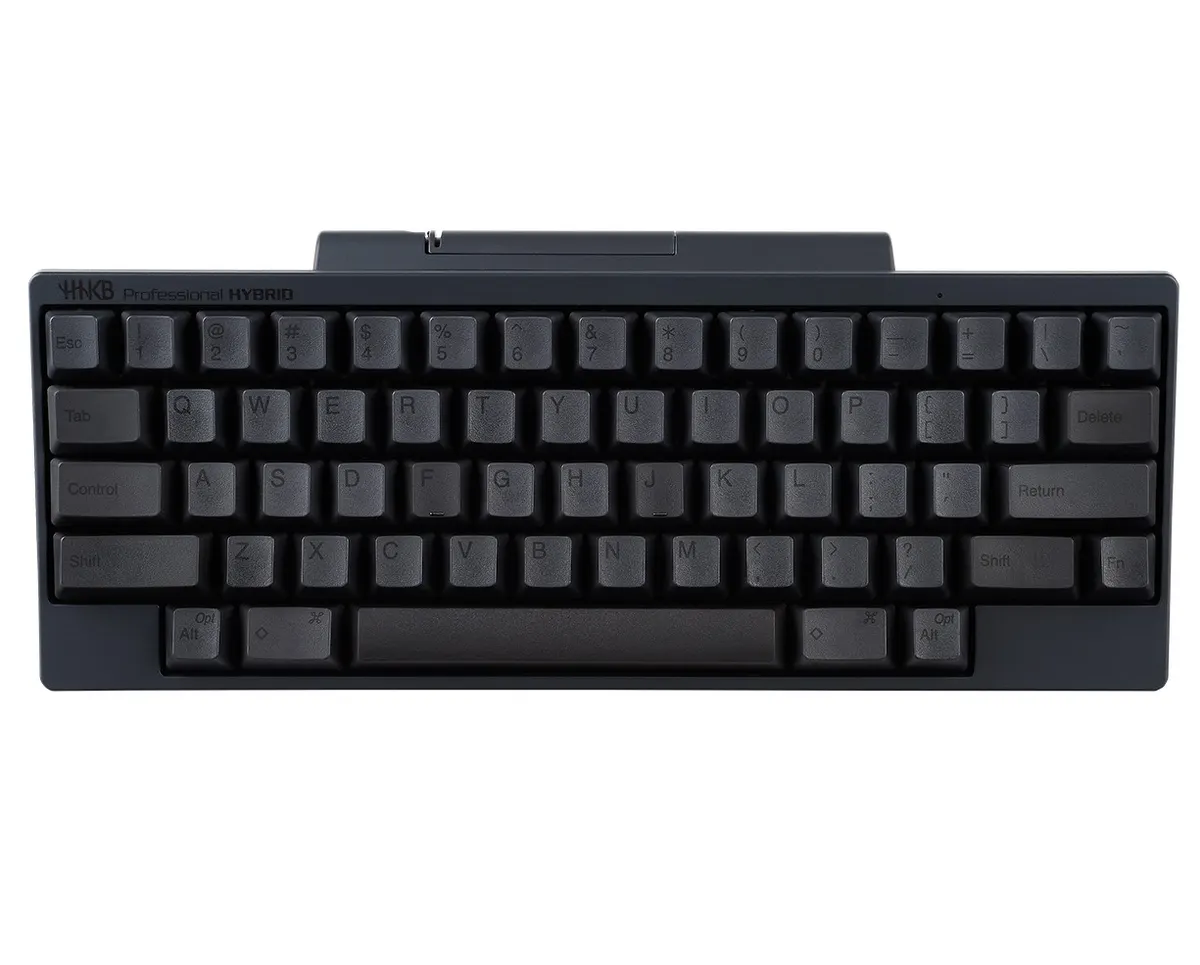
The standard HHKB Professional HYBRID. Image: PFU America.
Sound: closer than I expected
Mechanical keyboard sound has always appealed to me, so I went in assuming the louder standard would be my pick. I recorded both boards with one microphone, one mic position and identical settings; that comparison is in my video.
The Type-S came out a touch quieter to my ears. The drop is modest, and it played almost no part in my decision.
Feel: where the Type-S pulls ahead
What separated them was the feel. Keys on the standard bottom out with a slightly sharper edge. The Type-S takes the same press and absorbs it, as if each key rests on a small cushion.
That softness makes typing genuinely satisfying, and I kept finding reasons to type more. The Type-S feels like the finished version of what the standard was aiming for.
I wouldn’t attribute that to the 0.2 mm difference in travel. The softness is what I notice, every time I go back to the standard.
Layout: the hard part on both boards
Switching to this layout was rough. Nothing else I’ve typed on puts the keys where the HHKB does.
There is history behind it. The first Happy Hacking Keyboard shipped in 1996, aimed at programmers working in Unix, which is why Control occupies the spot most boards give to Caps Lock. There’s no arrow cluster: arrows come from holding Fn and pressing a letter. Delete also moves to an unfamiliar spot.
I did adapt, but it took real effort, and I never came to enjoy the layout. The Type-S doesn’t help here, since its layout matches the standard key for key.
Mac users who plan to remap their way out of it should know one thing: PFU’s keymap tool runs only on a Windows PC connected over USB. Without that, the six DIP switches are your only way to change keys.
Buying in the US and Canada
- Where: PFU America’s US store carries both, the Type-S and the standard Hybrid. The prices above come from those pages on November 9, 2026.
- Shipping: delivery is limited to the 50 US states. Keyboard orders of $200 or more ship free via FedEx Ground, which PFU estimates at three to five business days.
- Returns: check this first. According to PFU’s store FAQ, its 30-day money-back guarantee applies only to scanners and portable monitors. Everything else, keyboards included, is final sale and can’t be canceled or refunded.
- Warranty: PFU America offers a 2-year advance exchange warranty.
- Canada: PFU America told us HHKBs aren’t sold in Canada.
These links don’t earn me anything. PFU America has no affiliate program.
Should you buy it?
Of the two, the Type-S is my pick. The softer keystroke is worth the extra money, and at November 9 sale prices that extra is only $30.
If your work leans on dedicated arrow keys, Caps Lock or a number pad, neither board is for you. Both are excellent keyboards, built around a layout that expects you to change your habits.
Specs
These are the maker's published figures unless a line says it comes from my own use.
- Layout
- 60 keys, HHKB layout (no arrow keys, no function row, Control in the Caps Lock spot)
- Switches
- Topre electrostatic capacitive, silent on the Type-S
- Actuation force
- 45 g (both models)
- Key travel
- 3.8 mm on the Type-S, 4.0 mm on the standard
- Connections
- USB-C and Bluetooth, up to 4 Bluetooth devices
- Keycaps
- PBT, dye-sublimated legends
- Customization
- 6 DIP switches; keymap software needs a Windows PC over USB
- Typing angle
- 3 heights
- Warranty
- 2-year advance exchange (PFU America)
- Model tested
- CG01000-297201 (Type-S, charcoal, printed keys) and CG01000-296601 (standard, charcoal, printed keys)
Final verdict
The Type-S won, and it wasn't close. The softer keystroke is what you pay extra for, and after two weeks on the standard I knew within minutes of switching that this was the one I'd keep.
The catch applies to both boards: the HHKB layout. I've always used full-size keyboards, with Caps Lock, a proper arrow cluster and a number pad. I adapted to this layout without ever growing fond of it. If any of those keys matter to your daily work, think hard before buying either HHKB, or pass on both.


